I shifted my place of work from one room to another in the same flat. The modem is hard to move, and the router I bought does not have enough signal power to reach the new room where I work from. After many attempts of using reflectors and other devices to increase the antenna power of the router... I decided to buy a new router. Here goes what I did:
(If some of the terms like IP, DHCP, MAC, etc, sound difficult now, don't worry, go ahead and once you start doing things with the router you will understand them all)
1. Buy second router of the same brand as the first one. It may work with different brands as well, but this minimizes the errors, I think. Do confirm that the router has the capacity to be used as a bridge before buying the second router. In my case, I'm using: PN-11N WRT - 11N Wireless Router
2. Switch on your new router and connect it through LAN to your computer (if you have two computers it will help a lot).
3. Browse to the configuration page of the router, e.g. http://192.168.1.1
4. Change IP address of the router to anything else (e.g. 192.168.1.10), reboot the router for this to take effect.
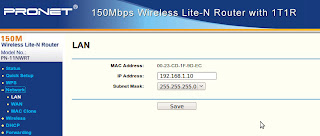
5. Browse again to the router, this time to the new IP. In my case http://192,168.1.10
6. Go the wireless settings and enable "WDS". From the router help you can read:
Enable WDS - You can select this to enable WDS, with this function, the Router can bridge two or more Wlans. NOTE: If this checkbox is selected, you had better make sure the following settings are correct.
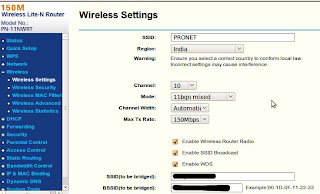
7. If there is a "Search" option, click on it to find the router to which you want to connect. Of course, make sure that that router is ON!
If there is no Search function, enter the SSID (the name of the router) and the BSSID (the MAC address of the router) of the router you want to connect with.
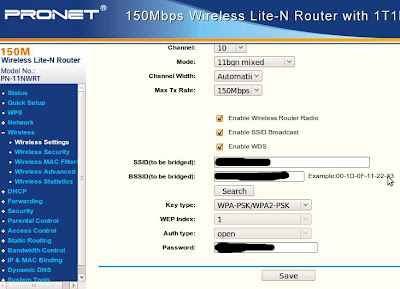
8. Enter the right Key type of the first router and the password to connect to it. Click on Save.
9. Go to the Wireless Security options and enter the Key type and password. I think these could be different from the other, but I took the same.
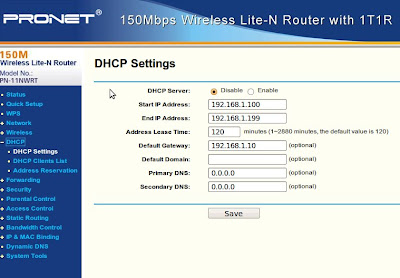
10. Go to DHCP Settings and disable them. Save.
11. Reboot the router (soft-reboot of course).
By now the router should work as a bridge, catching the signal from the first router and repeating it. The one actually assigning IPs to the computers connected to it is the first router (that's why you disabled DHCP).
Make sure the bridge router gets good enough signal from the first router so that it can repeat it. In my case I had to place the bridge outdoors (well protected... I hope) so as to be able to get the signal required.


